


Zen Color - Color By Number
4.61.48K Reviews
App Specs
- Version
- 2.2.7
- Updated On
- License
- Free
- Downloads
- 1,000,000+
- Developer
- Oakever Games
- Categories
- Casual
- Platform
- Android
Screenshots

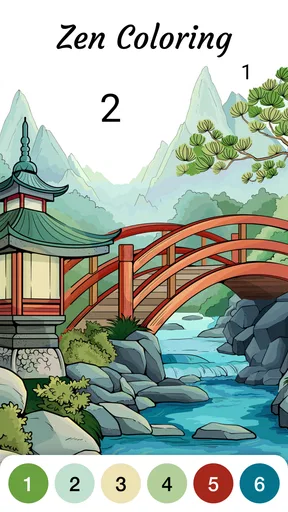
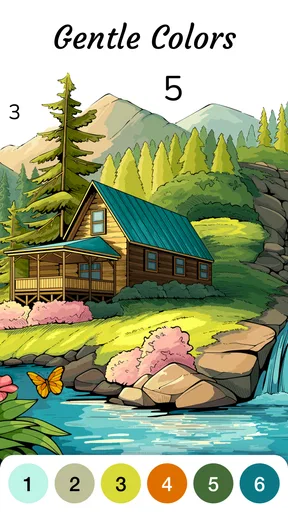
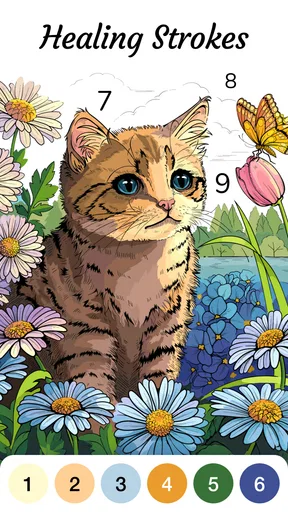
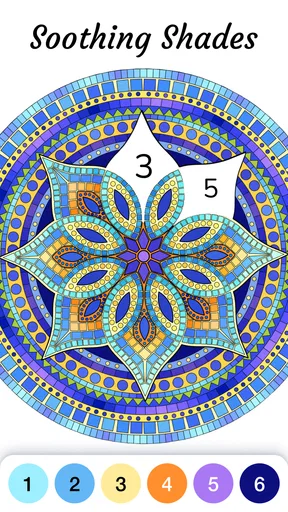
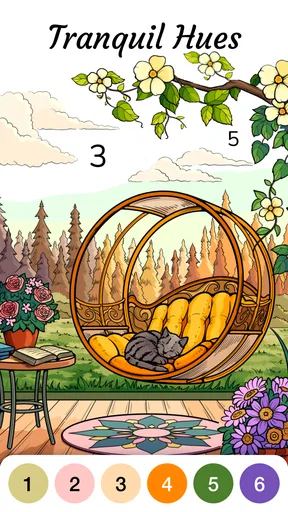
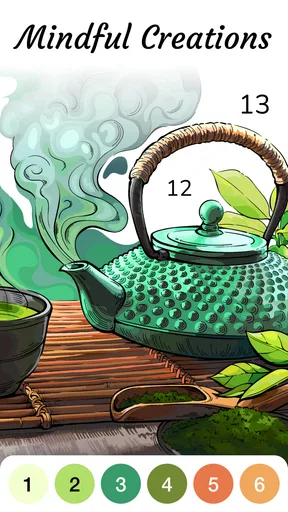
 Analysis by AppCompare
When I want a quiet activity that asks for a little attention but no artistic skill, number-based coloring is an easy option to reach for. Zen Color - Color By Number is a casual game by Oakever Games built around that kind of short, focused break. I’d consider it most useful when I want to settle into a simple task for a few minutes, rather than start a game that demands quick reactions or a long session.
Choosing the right kind of coloring break
Before downloading a coloring game, I’d ask what I actually want from it. If the appeal is choosing every color and making a picture entirely my own, a blank-canvas drawing app is a better match. If I want a low-pressure activity with clear next steps, numbered sections make the decision for me: I find a color and fill its matching spaces. That structure is the central reason I’d choose this style of game.
It also suits different kinds of downtime. I can imagine opening it while waiting for an appointment, taking a screen break between chores, or winding down after work. The task gives my attention somewhere specific to go, but it doesn’t require the planning or dexterity of a puzzle with a timer. For me, that makes the game easier to pick up when I’m tired and don’t want to work out what to do next.
Who is likely to enjoy it
I’d point this toward people who like gentle routines, picture-making, and progress they can see as they go. It may also suit someone who wants to try digital coloring without learning drawing tools. Since the game is rated Everyone, it can be an approachable option to consider across ages, though whether its pace feels engaging will depend on the person.
The trade-off is that the numbered approach gives up some creative freedom in exchange for guidance. You follow the picture’s planned colors rather than choosing a palette from scratch. If you enjoy experimenting, sketching, or correcting your own work, that can feel restrictive; a drawing app or open-ended art game would give you more control. I’d also skip this if I’m looking for a demanding challenge, a competitive match, or a story-led game. Coloring is the main attraction, so its relaxed pace is a feature only if that is what you want.
Where it fits among casual alternatives
Compared with freeform coloring, this format removes the pressure of deciding where every shade belongs. Compared with logic puzzles, it puts less emphasis on finding a single solution and more on gradually completing an image. Those differences are useful when I want a calmer activity, but they also explain why it won’t replace either alternative for someone who wants expressive control or a tougher mental workout.
A practical way to use it is to treat a picture as a stopping point, not an obligation to finish in one sitting. I’d start when I have a few spare minutes, fill a small stretch of matching spaces, then put the phone down if I need to. That keeps the activity easy to fit around real life and avoids turning a restful break into another task on a checklist.
Worth Reading Before You Choose

EA SPORTS FC Mobile 26 Is a Bigger Football Game, but It Takes Time

Flipboard Shows What News Apps Must Do Beyond the Feed

Switching to Android Auto Means Rethinking Your Driving Routine

Google Calendar Makes a Crowded Week Easier to Manage

Ludo King Makes the Most of the Minutes Between Plans

Baby Panda World Brings Quick Play to Modern Phones, but Its Game Library Feels Busy
A low-pressure routine, with a few trade-offs
For example, after a busy day I might open the game while waiting for tea to steep. Rather than scroll through social feeds, I can focus on one image and complete a few sections. The numbered layout helps me return to the task without needing to remember a complicated plan. If I’m interrupted, I can simply stop and pick it up later; the appeal is the small, visible progress, not racing to the finish.
One useful habit is to choose a picture based on the attention I have available. When I’m tired, I’d favor an image that looks easier to work through; when I feel like lingering, a more detailed image may give me a longer activity. That’s a general way to pace a number-coloring session rather than a promise that every image will suit every mood. It also helps me decide whether I want a brief pause or a longer stretch of concentration.
The format has limits that are worth keeping in mind. Repeatedly matching numbers can become routine, and the same guided approach that makes starting easy may feel predictable after a while. It’s also screen-based: if I’m trying to rest my eyes or get away from my phone, paper coloring is the more sensible choice. And if I’m hoping to develop drawing skills, filling predetermined sections is not a substitute for sketching or practicing technique.
How the game feels once you start
I’d use the first few minutes to notice whether matching numbered spaces feels pleasantly absorbing or starts to feel like a chore. That small check matters more than finishing a picture: it tells me whether this guided pace fits the kind of break I’m after. From there, I can judge what the game’s coloring routine offers—and where its limits begin.
First Impressions
So, let’s talk first impressions. The moment I opened Zen Color - Color By Number, I was greeted by a sleek and inviting interface. The design is intuitive, making it easy for anyone to jump right in. Within seconds, I was browsing through a plethora of intricate designs waiting to be filled with vibrant colors. If you're someone who gets overwhelmed by cluttered screens, you'll appreciate the minimalist design here.
The Experience of Coloring
Now, onto the actual coloring experience. The app offers a vast library of artwork, ranging from simple patterns to intricate landscapes. Each artwork is divided into numbered sections, and your task is to match each number with the corresponding color. It's like a digital version of those paint-by-numbers kits we loved as kids, but without the mess!
One of the features I absolutely adore is the color palette. It’s rich, diverse, and seems to capture every shade imaginable. The best part? You don't have to worry about going outside the lines. The app ensures a precise coloring experience, making it almost meditative as you tap and fill each section.
Why It's Relaxing
So, why exactly does coloring feel so calming? Well, according to some experts, focusing on coloring can help reduce anxiety and increase mindfulness. As I colored away, I found myself getting lost in the gentle rhythm of tapping colors onto the screen. It’s an excellent way to unwind after a hectic day.
The app also offers a relaxing background score that complements the coloring activity. The ambient sounds are subtle and soothing, further enhancing the overall zen-like experience. If you're like me and sometimes need a little help finding your chill, this feature is a game-changer.
Additional Features
Beyond coloring, the app also offers some nifty features. For instance, you can share your completed artwork directly from the app. Perfect for when you want to show off your masterpiece on social media or send it to a friend.
For those who like a bit of competition or goals to work towards, Zen Color includes daily challenges and themed events. These little extras add variety and keep the app engaging over time.
Accessibility and Usability
In terms of accessibility, the app is available on both Android and iOS, which is always a plus. I didn’t encounter any bugs or crashes during my time with it, making for a smooth and enjoyable experience. The app doesn’t eat up too much battery, so you can relax and color without worrying about your phone dying mid-session.
Finding the right fit before you settle in
Because this is a guided coloring game, I’d use the first session to see whether its rhythm suits me rather than judge it by how many pictures I finish. If the process of finding matching spaces feels calming, that’s a good sign it fits the kind of break I want. If I keep wishing I could alter the picture or choose different shades, I’d take that as a signal to switch to a more open-ended creative app instead.
It’s free to play, with in-app purchases listed at $9.99 per item. I’d keep that in mind if I prefer not to spend inside games: the free starting point makes it easy to try, but I’d check any purchase details before confirming one. The game’s current version is 2.2.2, and it requires Android 7.0 or later on Android devices. Its release date is February 24, 2026, so I’d make sure my device meets the operating-system requirement before installing.
Its audience figures suggest it has found a substantial casual-game audience: it has over one million installs, around ten thousand ratings, and about one thousand written reviews, with a 4.7 average rating. I treat those figures as context rather than a guarantee that I’ll enjoy it. The more useful question is whether I like following numbered color prompts, because that is what makes this particular game distinct from a drawing tool or a conventional puzzle.
Relaxation without expecting a cure
I find it helpful to think of coloring as a pleasant focus exercise, not as a replacement for professional support or a guaranteed way to manage anxiety. Some days, a repetitive activity can help me stop switching between distractions; other days, I may find the same repetition dull. The background score and ambient sounds can add to the mood, but I’d turn to another activity if I want silence, need to concentrate on something else, or simply don’t feel like listening.
Sharing a finished image can be a nice endpoint if I enjoy showing what I’ve made, but I wouldn’t make posting it the reason to play. The best use, in my view, is private and uncomplicated: open a picture, follow the color prompts, and stop when the break is over. That keeps the game’s social and goal-oriented extras optional rather than turning a quiet pastime into a performance.
Additional Features
Beyond coloring, the app also offers some nifty features. For instance, you can share your completed artwork directly from the app. Perfect for when you want to show off your masterpiece on social media or send it to a friend.
For those who like a bit of competition or goals to work towards, Zen Color includes daily challenges and themed events. These little extras add variety and keep the app engaging over time.
Accessibility and Usability
In terms of accessibility, the app is available on both Android and iOS, which is always a plus. I didn’t encounter any bugs or crashes during my time with it, making for a smooth and enjoyable experience. The app doesn’t eat up too much battery, so you can relax and color without worrying about your phone dying mid-session.
Final Thoughts
All in all, Zen Color - Color By Number is a fantastic app for anyone looking to add a splash of creativity and relaxation to their daily routine. Whether you're a seasoned artist or just someone who loves to doodle, this app offers something for everyone. It’s easy to use, beautifully designed, and genuinely relaxing.
If you’re stressed, overwhelmed, or just need a little break, I’d highly recommend giving Zen Color - Color By Number a try. It’s more than just an app; it’s a little pocket of peace you can carry with you anywhere.
My recommendation
I’d recommend trying it if the appeal is a calm, guided coloring routine and you’re comfortable letting the numbered design set the direction. It’s a casual game from Oakever Games, rated Everyone, and its 4.7 average helps explain why many players have taken an interest. Those details make it easy to consider, but the deciding factor is still personal: whether matching colors feels soothing to you rather than repetitive.
If you want freehand control, richer artistic tools, or a challenge that tests strategy, I’d choose a different kind of app. If you want a straightforward way to spend a spare moment completing an image, this is a sensible one to try. I’d start without treating it as a commitment, see whether the pace works for me, and keep it around only if it genuinely makes my downtime feel better.
Pros
- User-friendly interface with intuitive controls.
- Wide variety of color palettes to choose from.
- Regular updates with new images and features.
- Offline mode available for coloring anywhere.
- Relaxing music enhances the coloring experience.
Cons
- Contains in-app purchases for advanced features.
- Ads can be intrusive during gameplay.
- Limited free content compared to premium.
- Some images may be too intricate for small screens.
- Requires regular internet for updates and ads.
FAQs for Zen Color - Color By Number
What is Zen Color - Color By Number?
Zen Color - Color By Number is a relaxing coloring app that offers users a tranquil experience by allowing them to color intricate designs using a simple number system. It features a variety of beautiful illustrations, from mandalas to nature scenes, providing a perfect escape for those seeking mindfulness and creativity.
Is Zen Color - Color By Number free to use?
Zen Color - Color By Number is free to download and offers a range of free illustrations to color. However, the app also includes premium features and additional artwork that can be accessed through in-app purchases or a subscription model, offering a more expansive coloring experience.
What platforms is Zen Color - Color By Number available on?
Zen Color - Color By Number is available on both Android and iOS platforms, making it accessible to a wide range of users. You can download it from the Google Play Store for Android devices and the Apple App Store for iOS devices, ensuring compatibility with most smartphones and tablets.
Can I use Zen Color - Color By Number offline?
Yes, Zen Color - Color By Number can be used offline once you have downloaded the illustrations you wish to color. This makes it a convenient option for users who want to enjoy a calming coloring session without needing an active internet connection, perfect for traveling or offline relaxation.
How does the color by number system work in Zen Color?
The color by number system in Zen Color is designed to be intuitive and user-friendly. Each illustration is divided into numbered sections, with corresponding color palettes displayed at the bottom of the screen. Users simply match the numbers to fill in the sections, resulting in beautifully colored artwork without the hassle of selecting colors manually.


